
Wholesale Distribution Automation: 7 Processes Every Distributor Should Automate
Discover seven ways wholesale distributors can reduce manual data entry, automate order processing, simplify freight quoting, and connect existing ERP systems without replacing their infrastructure.
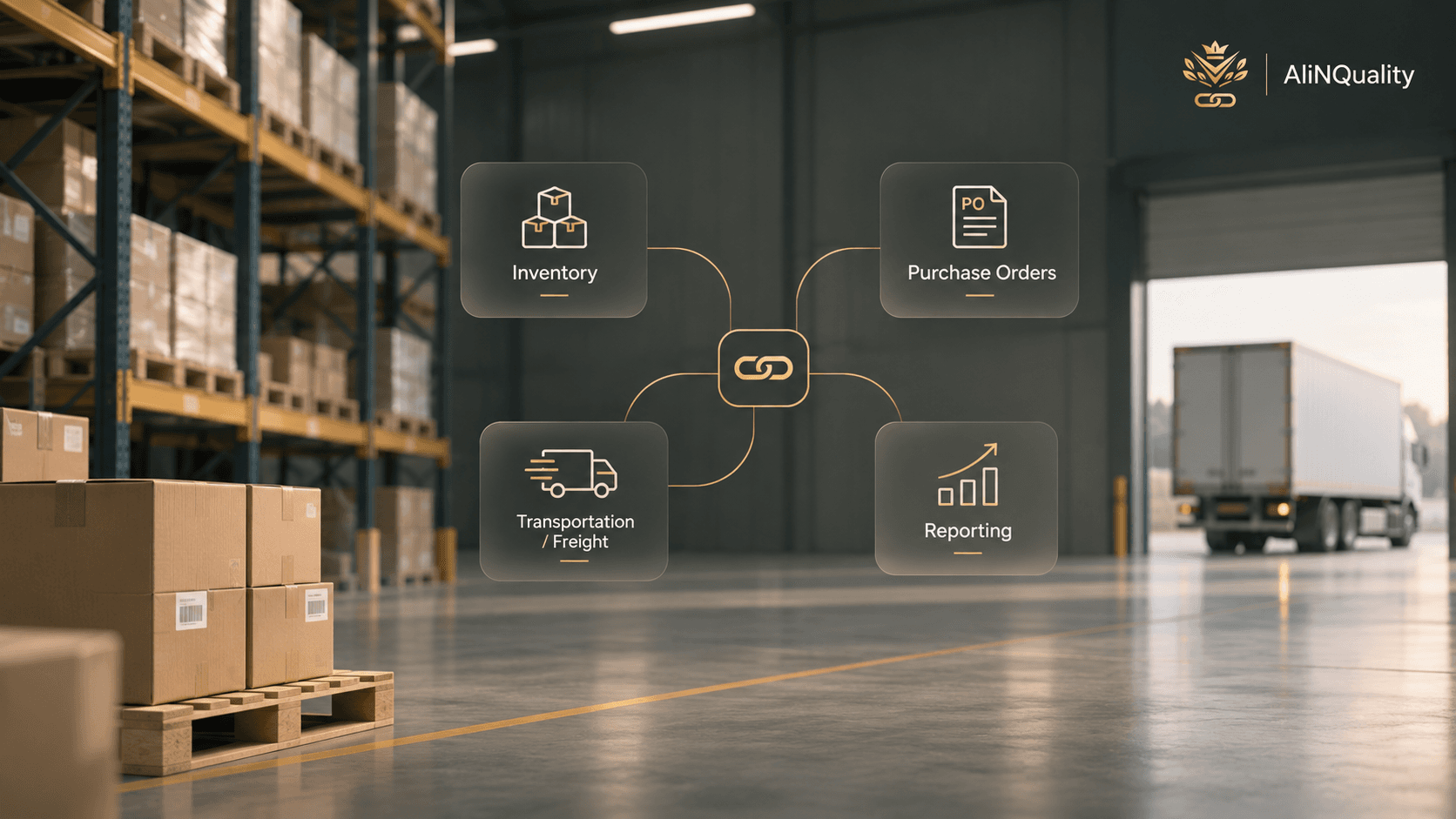
A wholesale distributor receives a purchase order by email. An employee opens the attachment, checks inventory, confirms customer pricing, enters the order into the company's ERP, contacts a freight carrier, and sends the customer a confirmation.
None of these tasks are particularly difficult on their own. But when they happen dozens or hundreds of times a week, they create a significant administrative workload.
The problem is not necessarily the employees or the software. It is often the disconnect between the systems a business already uses.
Wholesale distribution automation addresses this problem by connecting existing software, reducing repetitive administrative work, and allowing information to move between departments without unnecessary manual intervention.
For many distributors, this does not require replacing their ERP, changing their accounting software, or rebuilding their entire operation.
It starts with understanding where information stops moving.
What Is Wholesale Distribution Automation?
Wholesale distribution automation is the use of software, integrations, and business rules to simplify repetitive processes across a distribution business.
While warehouse automation often brings to mind conveyor belts, robotics, and automated picking equipment, administrative automation focuses on the work surrounding the physical movement of products.
This includes:
• Processing customer orders.
• Preparing and comparing freight quotes.
• Synchronizing inventory information.
• Generating operational reports.
• Managing purchase orders and supplier communications.
• Updating customers on order and shipment statuses.
• Reconciling documents and invoices.
A distributor may already have software capable of handling many of these responsibilities. The opportunity is often in connecting those capabilities into a consistent workflow.
At AliNQuality, our approach to automation and integrations begins with understanding the existing operation before recommending new technology.
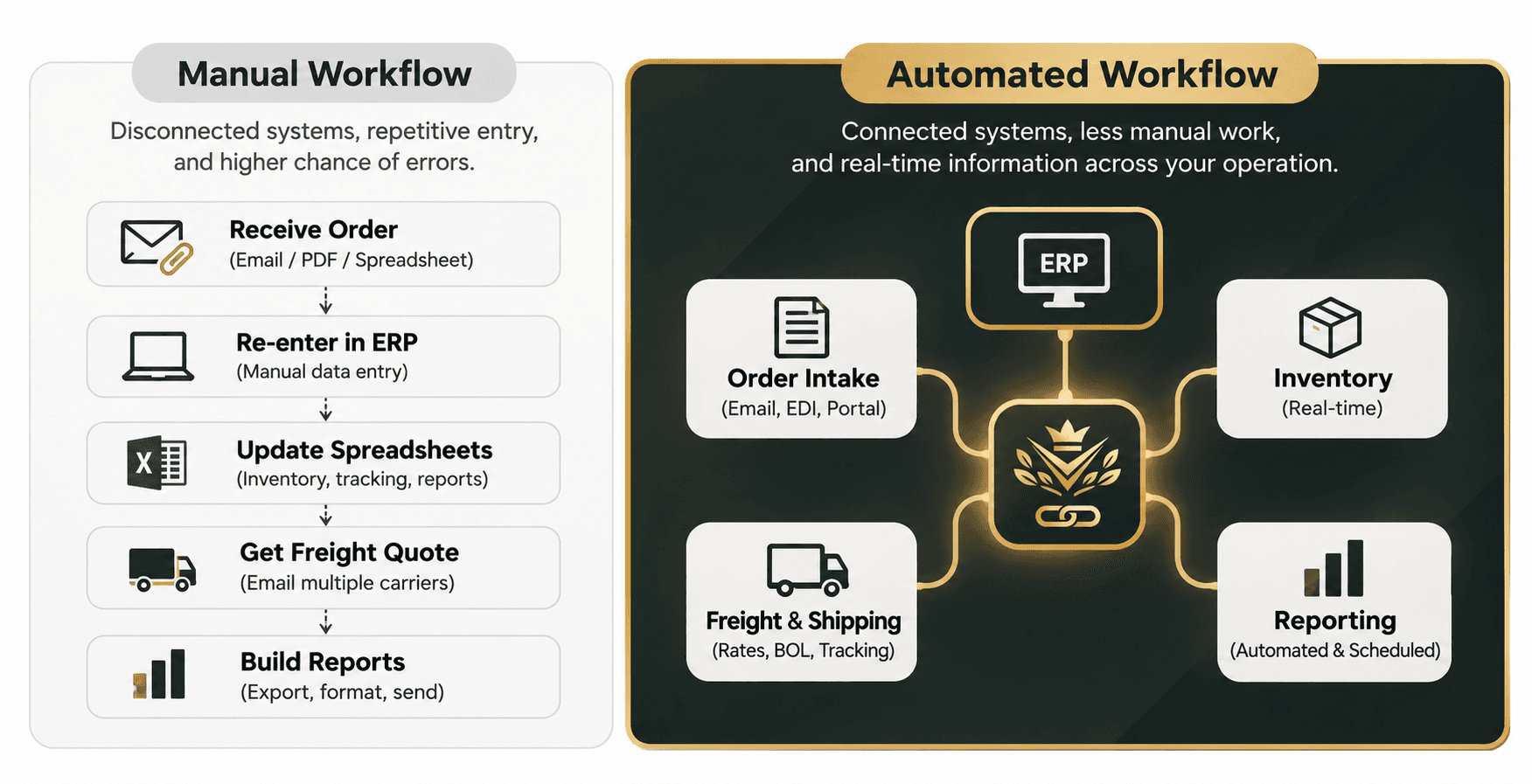
1. Customer Order Entry and Processing
Many wholesale businesses receive orders through email, phone calls, spreadsheets, customer portals, and electronic purchase orders.
An employee may need to interpret the request, identify the correct products, verify customer pricing, check availability, and manually create a sales order.
This process becomes more complicated when customers use their own product identifiers, order in different units of measurement, or have negotiated pricing agreements.
What can be automated?
• Extracting order information from emailed purchase orders.
• Matching customer product numbers to internal SKUs.
• Validating quantities, case sizes, and units of measurement.
• Retrieving customer-specific pricing.
• Checking available inventory.
• Creating draft sales orders within an ERP.
• Sending order confirmations.
Structured purchase orders can often be processed using traditional software integrations. Documents with inconsistent formatting may benefit from optical character recognition (OCR) or AI-assisted document extraction.
However, extracting information and validating it are two different responsibilities.
A properly engineered system should not assume that an extracted quantity, product number, or price is correct. It should verify that information against existing business records and route uncertain results to an employee for review.
For distributors working with larger trading partners, Electronic Data Interchange (EDI) may already provide a standardized solution. GS1's electronic data interchange standards support transactions including orders, deliveries, and invoices.
The right approach depends on how customers place orders and what systems the distributor already has available.
2. Freight Quoting and Carrier Management
Transportation can introduce considerable administrative work, particularly for distributors shipping pallets, oversized products, industrial materials, or high-volume orders.
A transportation coordinator might need to request quotes from multiple carriers, compare rates, review delivery requirements, and record the selected carrier in a separate system.
As shipment volume increases, maintaining an accurate history of these decisions becomes increasingly difficult.
What can be automated?
• Retrieving shipment details from existing sales orders.
• Requesting rates from supported carrier APIs.
• Organizing emailed freight quotes.
• Comparing transportation costs and estimated transit times.
• Recording selected carriers and quoted rates.
• Monitoring differences between quoted and invoiced shipping costs.
• Generating carrier spend reports.
For example, the official UPS Rating API allows eligible applications to request shipping rates programmatically.
Other carriers and freight providers offer their own integration methods, although API availability, access requirements, and supported services vary.
A distributor does not necessarily need a new Transportation Management System (TMS) to improve freight quoting. In some cases, a focused integration between existing order management software and transportation providers can address the specific problem.
The objective is not simply finding the cheapest carrier. It is giving employees reliable information to make better transportation decisions.
3. Inventory Synchronization and Discrepancy Reporting
Distributors frequently manage inventory across warehouses, customer portals, e-commerce platforms, marketplaces, and internal business applications.
When these systems do not communicate reliably, employees may need to manually investigate inconsistent product quantities or availability.
An inventory record can also have several meanings:
• On-hand inventory: Products physically recorded in stock.
• Allocated inventory: Products reserved for existing orders.
• Available inventory: Products available for additional orders according to business rules.
• Incoming inventory: Products expected from suppliers or transfers.
Publishing on-hand inventory as available inventory without accounting for reservations can create fulfillment problems.
What can be automated?
• Synchronizing inventory between connected systems.
• Identifying discrepancies between inventory records.
• Alerting employees when inventory falls below defined thresholds.
• Updating product availability on customer portals.
• Generating backorder reports.
• Tracking inventory synchronization failures.
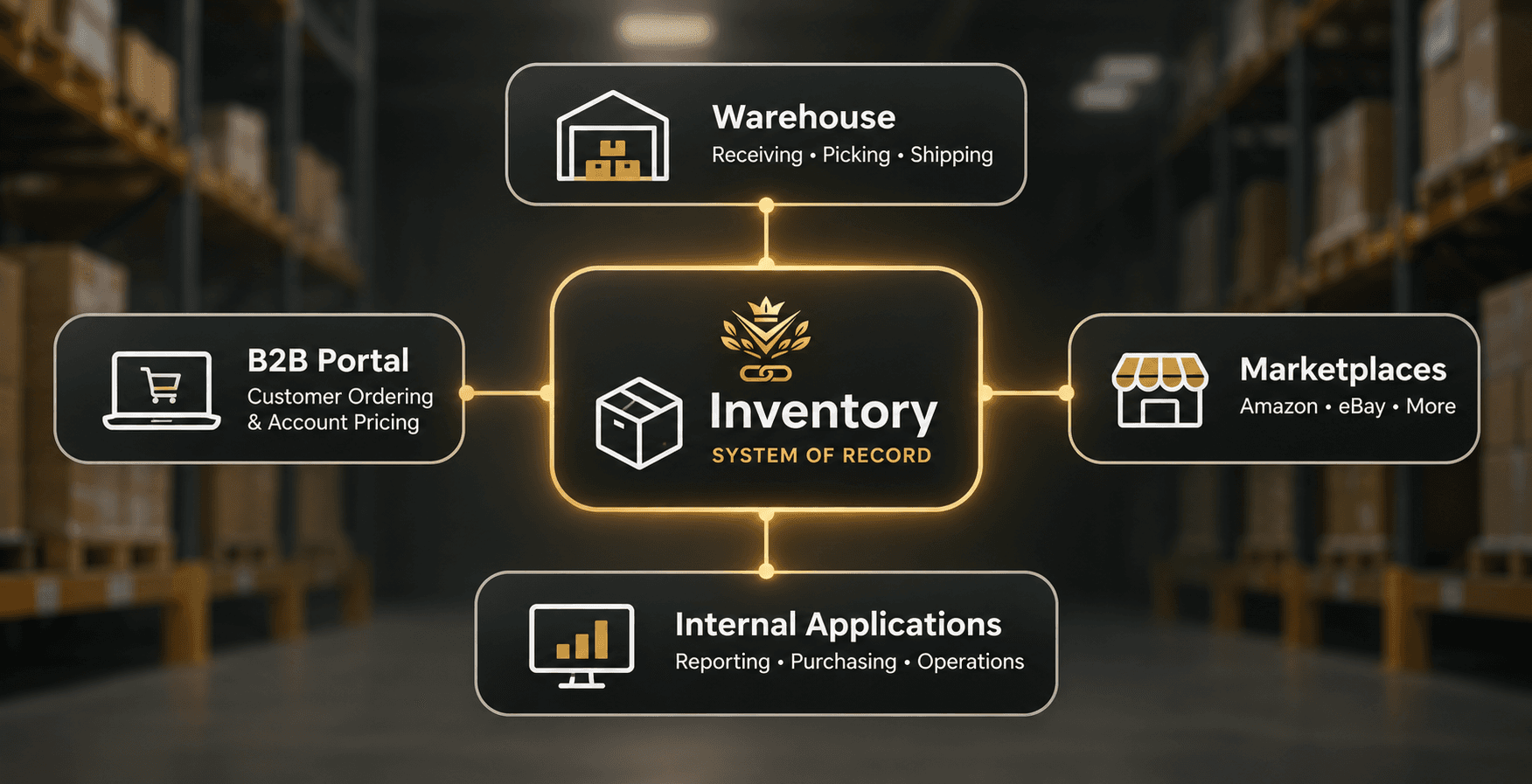
The most important engineering decision is establishing a system of record: the authoritative source responsible for maintaining each type of business data.
Rather than allowing multiple applications to independently modify inventory, an integration should respect existing inventory rules and clearly define which systems can read or write information.
This was an important consideration in our work with Plastic-Craft Products, where AliNQuality connected additional sales channels to an existing custom inventory system without discarding its established business logic.
Read our Plastic-Craft marketplace expansion case study to see how this approach works in practice.
4. Purchasing and Supplier Communication
Purchasing departments often manage supplier quotes, purchase orders, expected delivery dates, pricing changes, and outstanding inventory requirements.
When that information is spread across email conversations and spreadsheets, obtaining a complete picture of outstanding purchases can require considerable manual follow-up.
What can be automated?
• Generating purchase order drafts using defined replenishment rules.
• Tracking outstanding purchase orders.
• Identifying overdue supplier deliveries.
• Organizing supplier acknowledgments.
• Sending reminders about unconfirmed orders.
• Routing purchasing requests for approval.
• Comparing supplier pricing changes over time.
Not every purchasing decision should be automated.
A system can identify that inventory has fallen below a threshold and recommend a purchase, while an authorized employee remains responsible for approving quantities, supplier selection, and spending.
Existing platforms may already support these workflows. For example, Microsoft Power Automate provides approval workflows that can be used for documents, invoices, and other business transactions.
The goal is to remove unnecessary administrative steps while maintaining appropriate financial controls.
5. Shipping Documentation and Order Status Updates
After an order is processed, information still needs to move between sales, warehouse staff, transportation providers, accounting, and the customer.
Bills of lading (BOLs), tracking numbers, PRO numbers, packing slips, and delivery confirmations may all need to be associated with the correct shipment.
When this information is maintained manually, customer service employees can spend unnecessary time answering questions about orders that have already shipped.
What can be automated?
• Preparing shipping document drafts using existing order information.
• Associating tracking or PRO numbers with shipments.
• Retrieving carrier tracking updates.
• Notifying customers when orders ship.
• Identifying delayed shipments and delivery exceptions.
• Organizing proof-of-delivery documentation.
• Displaying shipment information within a customer portal.
Carrier integrations, such as the UPS Tracking API, provide a way for supported applications to retrieve shipment activity programmatically.
An integration should also account for real-world exceptions. An order may contain multiple shipments, partial deliveries, backordered products, or different transportation providers.
A reliable system must represent those situations accurately instead of treating every order as a single package.
For businesses looking to give customers greater visibility into their orders, B2B portals and digital operations systems can provide a self-service alternative to repetitive status update requests.
6. Operational Reporting and Excel Workflows
Excel is not necessarily a problem.
Many experienced operations managers use spreadsheets because they are flexible, familiar, and effective for analyzing information.
The problem begins when producing the same spreadsheet requires employees to repeatedly export data, combine files, remove duplicates, update formulas, and distribute reports.
What can be automated?
• Daily and weekly sales reports.
• Open order and backorder summaries.
• Carrier spend reports.
• Inventory discrepancy reports.
• Supplier performance summaries.
• Warehouse operational dashboards.
• Scheduled report distribution.
Depending on the existing infrastructure, reports can be generated using approved database connections, APIs, scheduled exports, or business intelligence tools.
A well-designed reporting workflow should also display when the underlying data was last updated. A dashboard displaying outdated information without warning can be more misleading than a manually prepared report.
Automation does not require eliminating spreadsheets. It can simply eliminate the repetitive work involved in preparing them.
7. Invoice Matching and Administrative Approvals
A distributor may receive a supplier invoice, locate the corresponding purchase order, confirm what was received, investigate discrepancies, and route the invoice for approval.
This process is commonly referred to as three-way matching when it compares:
• The original purchase order.
• The goods receipt or receiving record.
• The supplier invoice.
Automation can help compare these records and identify discrepancies before an employee completes the approval process.
What can be automated?
• Matching invoices to purchase orders.
• Comparing ordered, received, and invoiced quantities.
• Identifying unexpected pricing differences.
• Detecting potential duplicate invoices.
• Routing discrepancies to the appropriate department.
• Maintaining approval histories.
• Tracking outstanding exceptions.
Financial controls should remain intact. An automated workflow should not authorize payments simply because information appears to match.
Approval permissions, spending thresholds, exception handling, and audit records are essential parts of a reliable financial workflow.
How Distribution Automation Works Without Replacing Your ERP
One of the most common concerns with introducing new technology is disrupting systems that employees already depend on.
An Enterprise Resource Planning (ERP) system may have years of customer information, inventory records, pricing agreements, transaction history, and specialized business rules.
Replacing it to solve one operational problem may introduce more complexity than necessary.
A more practical approach is often to build an integration layer around the existing infrastructure.
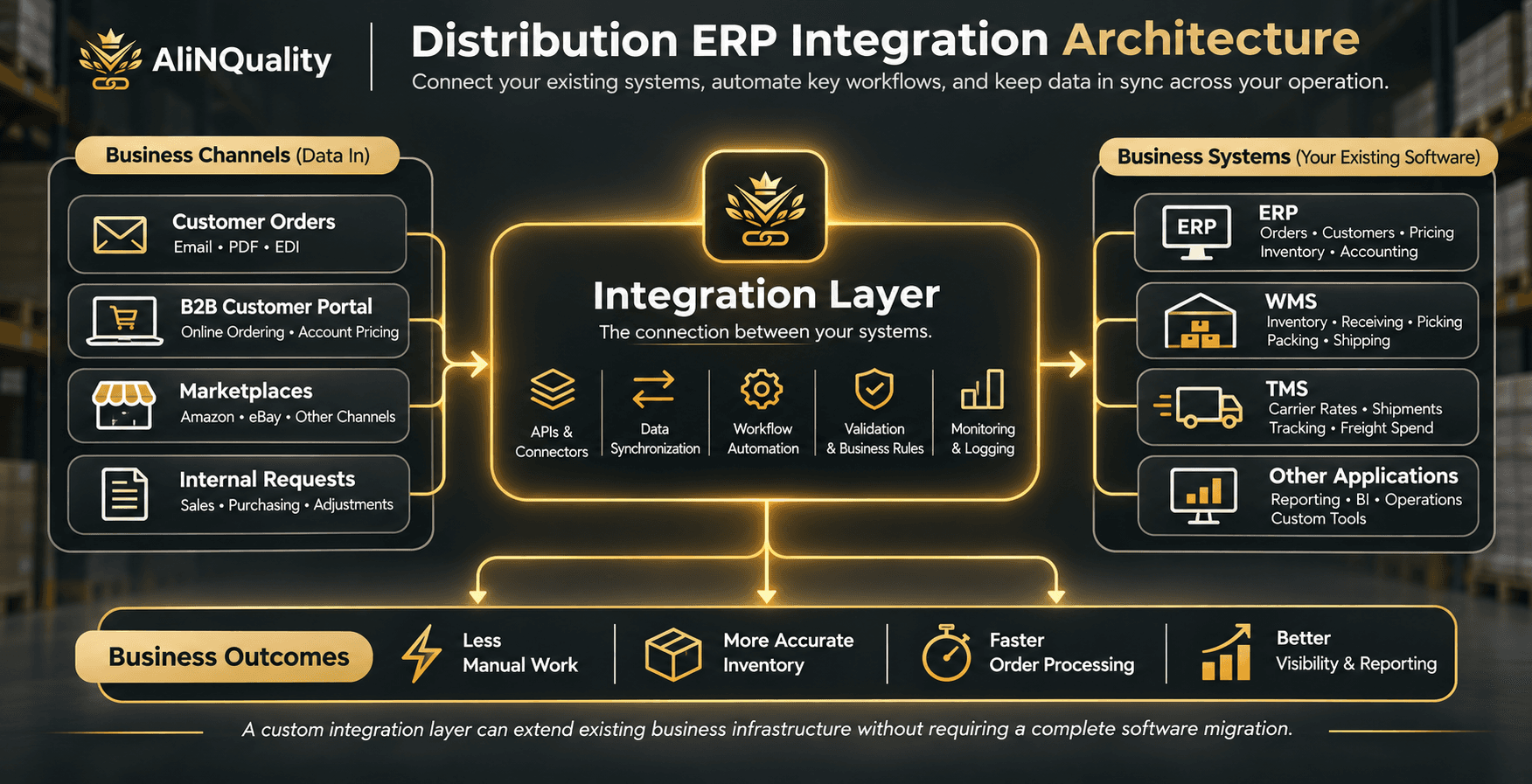
Depending on the software involved, this can be accomplished through:
APIs: Retrieving or updating records through supported software interfaces.
Webhooks: Receiving notifications when orders or other records change.
EDI: Exchanging standardized business documents with trading partners.
Scheduled file transfers: Processing CSV or XML exports from systems with limited integration capabilities.
Approved database connections: Generating internal reports from authorized data sources.
Custom internal applications: Providing employees with interfaces designed around specific operational responsibilities.
Choosing the correct integration method requires understanding the existing software's capabilities, permissions, licensing, and limitations.
What makes an integration reliable?
Moving data between two systems is only one part of the engineering process.
A production-ready integration should also consider:
• Data validation: Confirming that records contain valid product identifiers, quantities, prices, and required fields.
• Duplicate prevention: Ensuring that processing the same request twice does not create duplicate orders or transactions.
• Error handling: Recording failures and notifying employees when intervention is required.
• Access controls: Restricting integrations to the information and actions they actually need.
• Audit logs: Maintaining a history of important automated actions.
• Reconciliation: Checking that records remain consistent across connected systems.
For example, if an application sends a sales order to an ERP and the connection times out, it may not immediately know whether the order was created.
Blindly retrying that request could create a duplicate order.
A properly designed integration can use unique transaction identifiers, supported idempotency mechanisms, and reconciliation checks to prevent that outcome.
Amazon Web Services discusses this engineering principle in its technical guide, Making Retries Safe With Idempotent APIs.
These considerations distinguish a dependable business system from an automation that only works under ideal conditions.
Does Wholesale Distribution Automation Require AI?
No.
Many distribution workflows follow clearly defined business rules and are better served by traditional software engineering.
Traditional automation:
• Checking inventory against a defined threshold
• Generating scheduled reports
• Calculating prices using established formulas
• Routing approvals based on spending limits
• Retrieving carrier rates through APIs
AI-assisted automation:
• Extracting information from inconsistent purchase order documents
• Interpreting unstructured customer emails
• Classifying incoming supplier documents
• Summarizing lengthy communications
• Identifying relevant details within unstructured freight requests
AI can be useful when information is inconsistent or difficult to structure. Traditional programming is often preferable when accuracy, predictable behavior, and established business rules are the priority.
In many cases, the strongest solution combines both approaches.
The AI interprets the information, the software validates it, and an employee reviews exceptions.
How Much Can Distribution Automation Save?
The financial benefit depends on transaction volume, process complexity, employee time, and implementation costs.
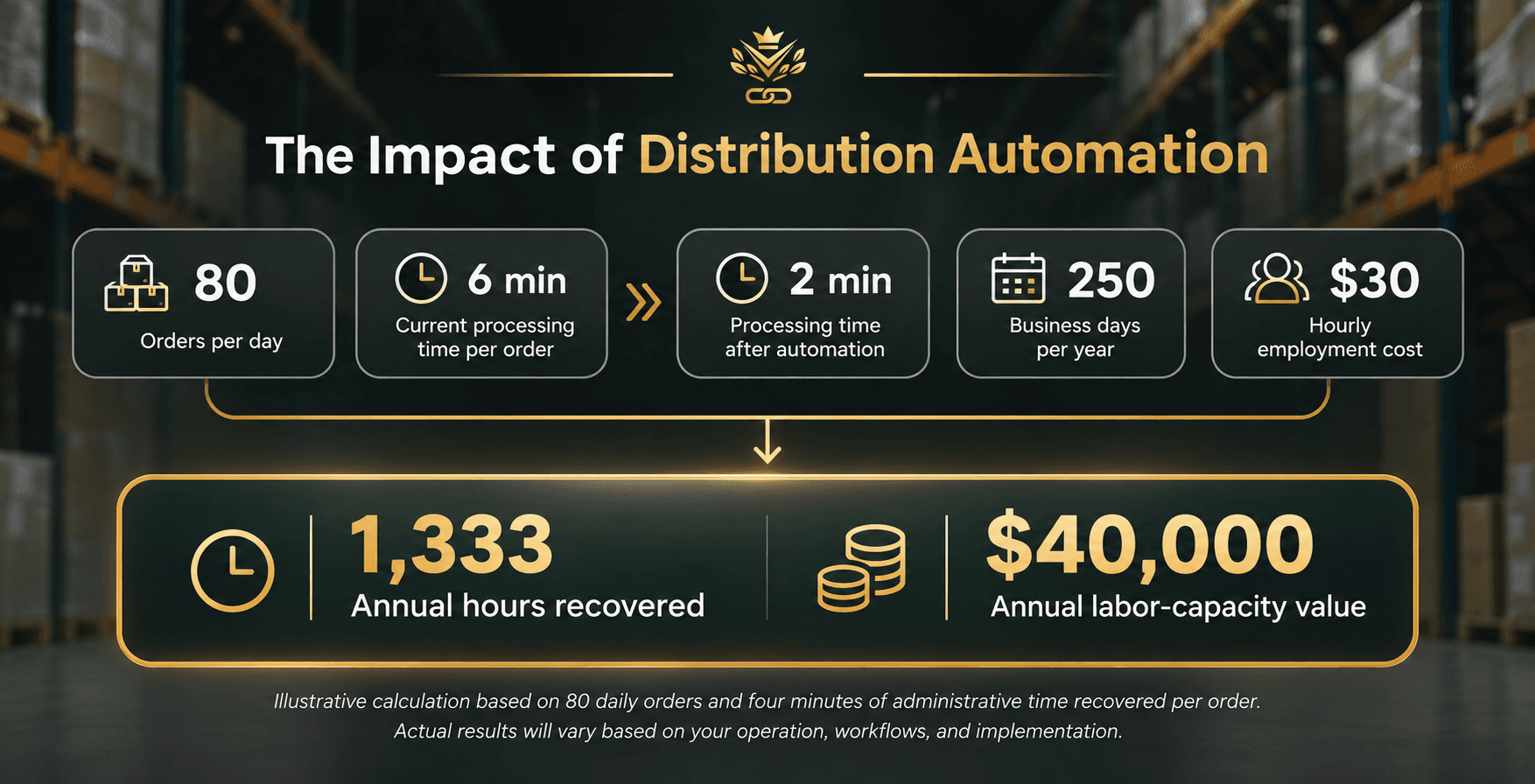
Consider a hypothetical wholesale distributor processing 80 orders per business day.
Assume each order requires six minutes of repetitive administrative work and an improved workflow reduces that requirement to two minutes.
Orders per business day: 80
Time saved per order: 4 minutes
Business days per year: 250
Annual employee hours recovered: Approximately 1,333
Assumed hourly employment cost: $30
Annual labor-capacity value: Approximately $40,000
This does not mean the business automatically saves $40,000 in cash or needs fewer employees.
It represents the estimated value of employee capacity that could be redirected toward customer service, sales, supplier negotiations, exception management, and other responsibilities.
Actual return on investment must account for development, maintenance, software licensing, training, and the time still required for human oversight.
The most valuable automation may not be the one that saves the most minutes. It may be the one that prevents expensive shipping mistakes, incorrect orders, missed claims, or avoidable customer disputes.
A Real Example: Improving Returns Logistics for a Manufacturer
Plastic-Craft Products, a plastics manufacturer in West Nyack, New York, faced a challenge involving marketplace returns.
Employees needed to evaluate returned products, collect appropriate documentation, and maintain sufficient evidence to support claims.
AliNQuality developed a custom returns logistics application that guided shipping handlers through a standardized review process.
Instead of relying on employees to remember every documentation requirement, the application incorporated those requirements into the workflow.
According to the published Plastic-Craft returns logistics case study, the company's claim success rate increased from 26% to 95% following the implementation.
This is an example of a narrowly focused operational problem being addressed through purpose-built software rather than an organization-wide technology replacement.
Individual project results vary, but the underlying principle applies across distribution and manufacturing: understand the process, identify the gap, and build around what already works.
Where Should a Wholesale Distributor Start?
Before purchasing another software platform, review how information travels through your existing operation.
Ask your team:
• Where are we entering the same information more than once?
• Which reports require repetitive preparation?
• Which processes depend on a particular employee remembering every step?
• Where do customers frequently request information we already have?
• Which administrative errors create the greatest financial consequences?
• Are we using the capabilities our existing software already provides?
The answers can help identify where automation would deliver measurable value.
Start with one clearly defined workflow. Establish a baseline, implement the improvement, measure the results, and expand only when the approach proves worthwhile.
Wholesale Distribution Automation in New York and New Jersey
AliNQuality is a technology company based in Rockland County, New York, working with businesses across the Lower Hudson Valley and Northern New Jersey.
We build custom business systems for distributors, manufacturers, wholesalers, and other businesses that need their existing technology to work together more effectively.
Our work includes internal applications, order processing workflows, B2B customer portals, software integrations, operational reporting, and specialized administrative tools.
We believe technology should adapt to the business, not force the business to adapt to unnecessary technology.
If your team is spending hours transferring information between systems, maintaining spreadsheets, or performing repetitive administrative tasks, start by understanding whether those processes can be improved.
Explore our solutions for distributors and manufacturers or request a free workflow audit to identify practical opportunities within your existing operation.
Frequently Asked Questions
Can a wholesale distributor automate operations without replacing its ERP?
Yes, provided the existing software supports suitable integration methods. APIs, EDI, scheduled exports, and other approved interfaces can allow additional applications to work alongside an existing ERP.
What is the difference between warehouse automation and distribution automation?
Warehouse automation often focuses on physical activities such as picking, sorting, and moving inventory. Distribution automation is broader and can include order entry, purchasing, transportation, reporting, invoicing, and customer communications.
What is the best process for a small distributor to automate first?
Start with a repetitive, measurable process that has clear business rules and relatively low implementation risk. Order entry, scheduled reporting, shipment notifications, and document organization are potential starting points.
Can older distribution software be integrated with modern applications?
Often, yes. Even when legacy software lacks a modern API, supported file exports, database interfaces, or EDI capabilities may provide alternative integration options. Technical feasibility must be evaluated individually.
Does automation replace warehouse administrators and operations employees?
Automation can reduce repetitive administrative responsibilities, but employees remain important for decision-making, customer relationships, exception handling, approvals, and operational oversight. A well-designed system supports their work rather than removing necessary human judgment.
Keep Reading
Related articles
AI Automation in Rockland County: Use Cases and Benefits for Local Businesses
What Are AI Agents? How Rockland County Businesses Can Actually Use Them
How to Automate Quotes and Orders for a Wholesale Business
Not Sure Which Service You Need?
Most projects don't fit a neat box. Talk it through with someone who's built real systems.
Already know what you need? Tell us what you're trying to build or fix. Talk Through Your Project