
What Are AI Agents? How Rockland County Businesses Can Actually Use Them
What can AI agents actually do for a small business? Explore real-world uses, costs, risks, and opportunities for Rockland County and nearby businesses.
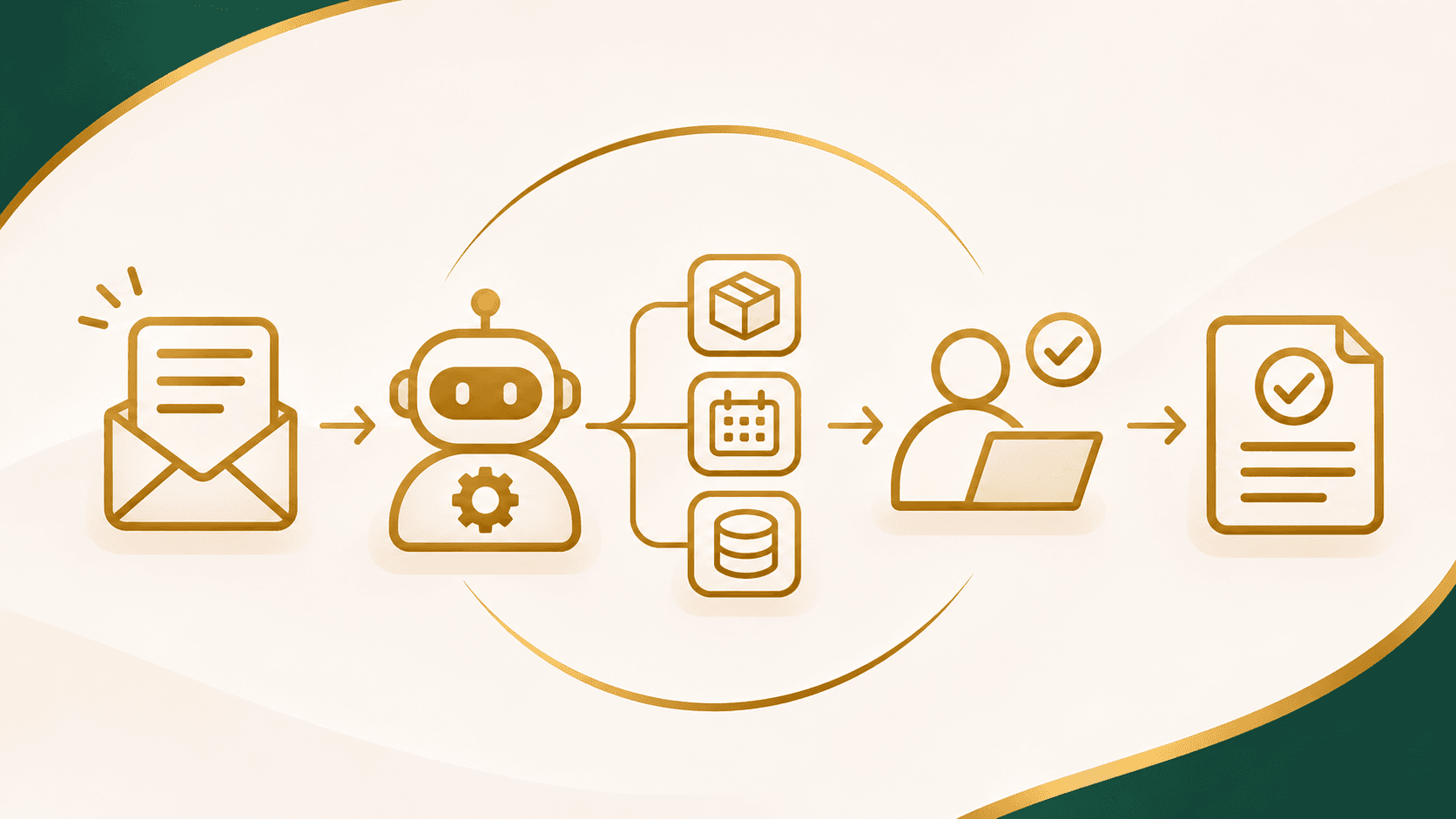
Imagine a customer contacting your business after hours.
They need a quote, have a few questions, and want someone to follow up the next morning. Normally, that request might sit in an inbox until an employee sees it.
Now imagine a system that can read the request, identify what the customer needs, check approved business information, prepare a draft quote, and assign the next step to the right employee.
That's the kind of work an AI agent can help with.
AI agents are attracting a lot of attention, but the name alone doesn't tell you whether one would actually help your business. For a small company in Rockland County, the useful question isn't, "How do we get the newest AI?" It's "What work could we handle more reliably without someone having to manage every step?"
Let's look at what AI agents are, how they differ from chatbots and traditional automation, and where they might make sense for businesses in Rockland County, Bergen County, and Westchester County.
What Is an AI Agent, in Plain English?
An AI agent is a software system that can work toward a goal by choosing steps, using connected tools, and acting on information it receives.
Instead of only giving you an answer, it may be able to do something with that answer.
For example, a customer-service agent might read a message, look up an order in an approved system, determine which information is missing, and prepare a response. With the right permissions, it could also create a support ticket or update a customer record.
The important part is that the agent isn't simply following one fixed sequence. It can handle some variation in what people ask and decide which permitted step to take next.
OpenAI's practical guide to building AI agents describes agents as systems that can carry out workflows on a user's behalf, using tools and instructions within defined safeguards.
That last part matters. An AI agent should have boundaries, not unlimited control over your business.
AI Agents vs. ChatGPT vs. Traditional Automation
These terms often get mixed together, but they aren't interchangeable.
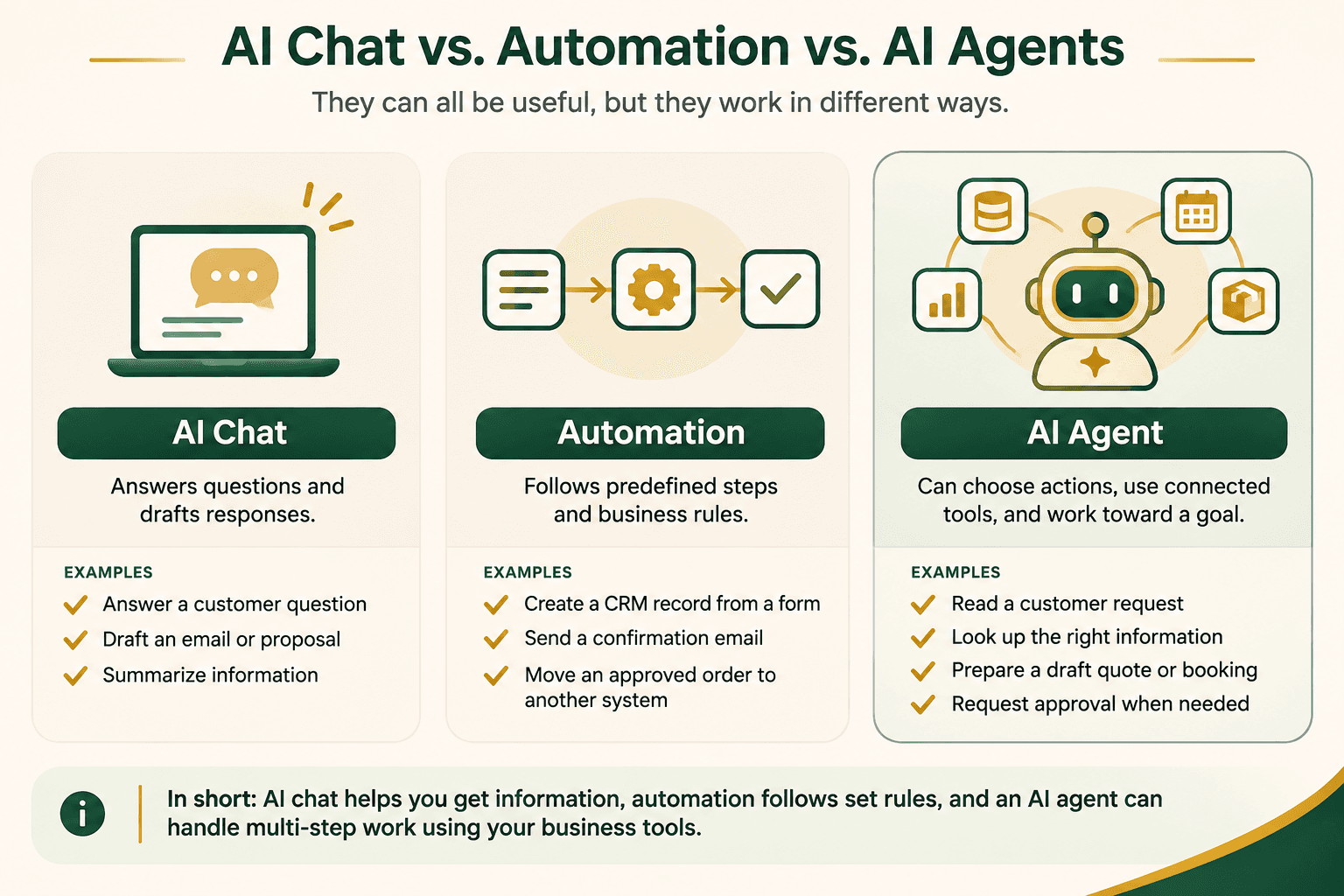
A chatbot or AI assistant primarily helps you ask questions, draft messages, summarize information, or find answers. Some assistants can also use tools, so the dividing line depends on what the system is connected to and allowed to do.
Traditional automation follows predictable rules. For example, when a website form is submitted, it creates a CRM record and sends a confirmation email. That's useful, but it doesn't necessarily need AI.
An AI agent can handle a less predictable request, choose between approved tools, and work through multiple steps to reach a goal. If information is missing or the situation falls outside its permissions, it should ask for help or stop.
Here's a simple distinction:
Automation follows defined steps. An AI agent can choose among defined actions. A person remains responsible for the decisions that matter.
Not every workflow needs an agent. If a task can be solved with a reliable rule, a normal automation may be cheaper, simpler, and easier to maintain.
For more on that foundation, see our earlier article on AI automation for Rockland County businesses.
What Can AI Agents Actually Do for a Small Business?
The most practical opportunities usually start with work your team already does every day.
1. Handle Customer Requests and Missed Calls
Imagine a home-service company receiving calls while its technicians are on job sites.
An AI-powered phone system could answer common questions, collect the caller's name and service address, identify why they're calling, and send the details to the office.
An agent with a permitted scheduling integration could go further: check available appointment windows, suggest appropriate times, and create a tentative booking when the business rules allow it.
If a caller describes an emergency, disputes a charge, or needs an exception, the system should route the request to a person instead of improvising.
The goal isn't to pretend customers are speaking with a human. It's to make sure important requests don't disappear when the team is busy.
2. Prepare Wholesale Quotes and Orders
Consider a distributor that receives an email asking for pricing on several products.
A connected AI agent could identify the requested items, check a product catalog, flag missing quantities, and prepare a draft quote for review.
If that customer has negotiated pricing or custom shipping requirements, the agent should use verified account information and request approval where necessary.
It shouldn't guess inventory levels or send an unapproved final price.
Once a quote is approved, conventional automation can move the information into the ordering process. This is a good example of AI and standard software working together rather than competing.
If your team already spends time entering the same orders into multiple systems, our B2B Operations solutions address quoting, portals, and the connected workflows behind them.
3. Read Documents and Organize Office Work
Many businesses receive invoices, purchase orders, forms, and other documents that aren't perfectly consistent.
An AI-assisted workflow might extract key details, check for missing fields, compare the information with a purchase order, and prepare a record for an employee to approve.
This can be useful for accounting teams, distributors, property managers, and offices handling recurring paperwork.
It also needs careful testing. A misread invoice number or amount can create a real problem, so financial entries and unusual documents should have validation and review built in.
4. Support Employees With Connected Information
Sometimes the best AI agent isn't customer-facing at all.
A staff member might ask, "What orders are still waiting for approval?" or "Which open requests haven't been assigned?"
If the agent has authorized access to reliable systems, it could retrieve the relevant records, summarize them, and help the employee take the next permitted action.
That may be more useful than another dashboard employees have to remember to open.
What Does an AI Agent Workflow Look Like?
Let's take a realistic example: a Rockland County contractor receives a new service request through the website.
Request received: The customer describes a problem and gives their contact information.
Information checked: The agent identifies the service type and checks the company's approved service-area and scheduling information.
Next step prepared: It creates a lead record, prepares a response, or suggests an available appointment window.
Employee approval: If the request involves uncertain pricing, an unusual job, or a commitment outside the normal rules, someone on the team reviews it.
Customer updated: Once the appropriate step is approved, the customer receives the correct confirmation and the team can see what happened.
This is an illustrative workflow, not a claim that every AI agent can perform all of these actions out of the box.
To work reliably, the system needs the right integrations, clear instructions, permission controls, and a way to handle failures.
How Autonomous Should an AI Agent Be?
The word autonomous can sound like the agent runs your entire business independently.
That isn't what most small businesses should aim for.
A useful AI agent might be allowed to organize an inbox, categorize requests, and prepare drafts without asking permission at every step. But sending a final price, issuing a refund, changing a customer account, or making a payment may require human approval.
Think of autonomy as a set of permissions, not an on-or-off switch.
Low-risk tasks: Collecting information, classifying inquiries, creating drafts, and suggesting next steps can often be good starting points.
Higher-risk tasks: Committing to prices, changing financial records, accessing sensitive information, or making irreversible decisions require stronger controls and, often, direct human approval.
This caution isn't just theoretical. In February 2026, the National Institute of Standards and Technology (NIST) announced its AI Agent Standards Initiative, focusing on how agents can operate securely and work with other systems.
For a business owner, the practical lesson is simple: giving an agent more access also gives you more responsibility to control what it can do.
Are AI Agents Actually Being Used by Businesses?
Yes, although adoption and maturity vary considerably.
McKinsey's 2026 State of AI survey reported that 40% of respondents from organizations with more than $1 billion in annual revenue said their organizations were scaling AI agents in at least one function. Among respondents from smaller organizations, that figure was 22%.
Those are broad survey findings, not figures for Rockland County or small businesses specifically. They show growing interest and deployment, but they don't tell us whether an AI agent will be worthwhile for your company.
A small business should judge a proposed agent by the process it improves, not by how quickly larger companies are adopting the technology.
What Are the Risks of Using AI Agents?
AI agents can make mistakes. They may misunderstand a request, use outdated information, select the wrong action, or encounter misleading content in an email or document.
A system with broad permissions can turn an ordinary misunderstanding into a much bigger issue.
Before connecting an agent to business software, make sure there are answers to these questions.
What information can it access? Customer records, employee data, and financial information should be limited to what the task actually requires.
What actions can it take? Reading a record is different from editing it. Creating a draft is different from sending it.
What happens when it's unsure? The agent should be able to stop, flag the issue, and hand it to a person.
Can you see what it did? Activity logs, testing, and ongoing review make it easier to identify errors and improve the workflow.
Are there privacy or industry requirements? A medical office, for example, may have obligations that a typical retail business doesn't. Those requirements need to be evaluated before connecting sensitive systems.
NIST's AI Risk Management Framework offers a useful reference for identifying, measuring, and managing AI-related risks over time.
How Much Does an AI Agent Cost for a Small Business?
There isn't one standard price, because the phrase "AI agent" can describe very different systems.
An agent that prepares internal email drafts is not the same project as one that connects your phone system, CRM, scheduling platform, and accounting software.
Initial development: The scope depends on the number of systems, the actions the agent must take, and the complexity of your business rules.
Ongoing usage: AI models, calling platforms, hosting, and connected services can have recurring costs that change with usage.
Maintenance and oversight: Someone needs to monitor errors, update instructions, test integrations, and respond when your process changes.
Instead of buying an agent based on a demo, estimate the work involved today. How many requests arrive each week? How long does each one take? How often are opportunities missed or information entered incorrectly?
A small pilot can help you learn whether the benefits justify the cost before expanding into more sensitive or complex workflows.
Does Your Business Even Need an AI Agent?
Not necessarily, and that's an important part of choosing the right solution.
If you're copying information between two programs, a direct integration may solve the problem without an AI model.
If every incoming request follows the same predictable rules, a structured form and ordinary workflow automation might be enough.
But if employees spend substantial time interpreting different types of messages, searching across systems, and deciding the next step, an agent may be worth exploring.
The best starting point is to follow one real customer request from beginning to end. Identify where the information comes from, what decisions are made, and which steps could be safely handled by software.
At AliNQuality, we approach these problems through AI integrations and workflow automation, with the goal of fitting technology to the process rather than forcing a process around the latest tool.
AI Agents for Rockland, Bergen, and Westchester County Businesses
A business in New City or Nanuet may face many of the same operational problems as one in Paramus, Hackensack, White Plains, or Yonkers.
Customer requests arrive after hours. Office teams move information between disconnected programs. Owners want to respond faster without adding another complicated system.
The industries differ, but the questions are similar: Can we capture the request? Can we find the right information? Can we move it to the next person or system without creating unnecessary work?
For businesses throughout Rockland County, New York; Bergen County, New Jersey; and Westchester County, New York, the most useful AI project often begins with one specific process—not an attempt to automate an entire company overnight.
Frequently Asked Questions
What is an autonomous AI agent?
It's an AI-based system that can take steps toward a goal with some independence, using tools and information it's authorized to access. The amount of autonomy should depend on the task and the risks involved.
Is an AI agent the same thing as ChatGPT?
Not automatically. A general chat experience primarily responds to user requests. An agent is designed to carry out a workflow using connected tools and permitted actions. Some AI assistants can also function as agents when configured with those capabilities.
Can an AI agent connect to my existing business software?
Sometimes. It depends on whether your CRM, scheduling, accounting, or other platforms offer suitable integrations and what permissions are available. Compatibility should be checked before development begins.
Can AI agents work 24/7?
A properly hosted system may be available outside business hours, but that doesn't guarantee every request can be completed. Outages, access limits, uncertain information, and human approval requirements still matter.
Can AI agents replace employees?
They can reduce time spent on certain tasks, but they still need supervision, reliable information, and clear rules. For most small businesses, a sensible first goal is supporting employees rather than replacing judgment and customer relationships.
How do I know whether an AI agent will save my business money?
Measure the current workload, identify the steps the agent could realistically handle, and compare the expected time savings and service improvements against development and ongoing costs. Test the workflow before making broader claims about savings.
Final Thoughts: Start With a Real Problem, Not an AI Trend
AI agents are capable of more than answering questions. When thoughtfully connected to business tools, they can help move work forward, prepare decisions, and keep information from getting stuck between systems.
But autonomous doesn't have to mean unsupervised, and an AI agent isn't always the right answer.
Sometimes the better solution is a straightforward integration, a more useful customer form, or a clearer approval process.
The real opportunity is finding work your team shouldn't have to repeat—and deciding which parts software can safely take over.
Want to Explore AI Agents for Your Business?
AliNQuality helps local businesses connect their tools, streamline operations, and explore practical AI solutions.
Based in Rockland County, we work with businesses across the surrounding region, including Bergen County and Westchester County.
If you're considering an AI agent for customer requests, quoting, scheduling, document handling, or internal operations, we can help you identify where it makes sense to start—and where traditional automation may be the better choice.
We'll take a look at how your process works and provide practical recommendations in writing, whether or not you decide to work with us.
Not Sure Which Service You Need?
Most projects don't fit a neat box. Talk it through with someone who's built real systems.
Already know what you need? Tell us what you're trying to build or fix. Talk Through Your Project