
How Distributors Can Sync Inventory, Pricing, and Online Orders
Learn how distributors and manufacturers can connect inventory, customer-specific pricing, and online orders to existing systems without replacing everything.
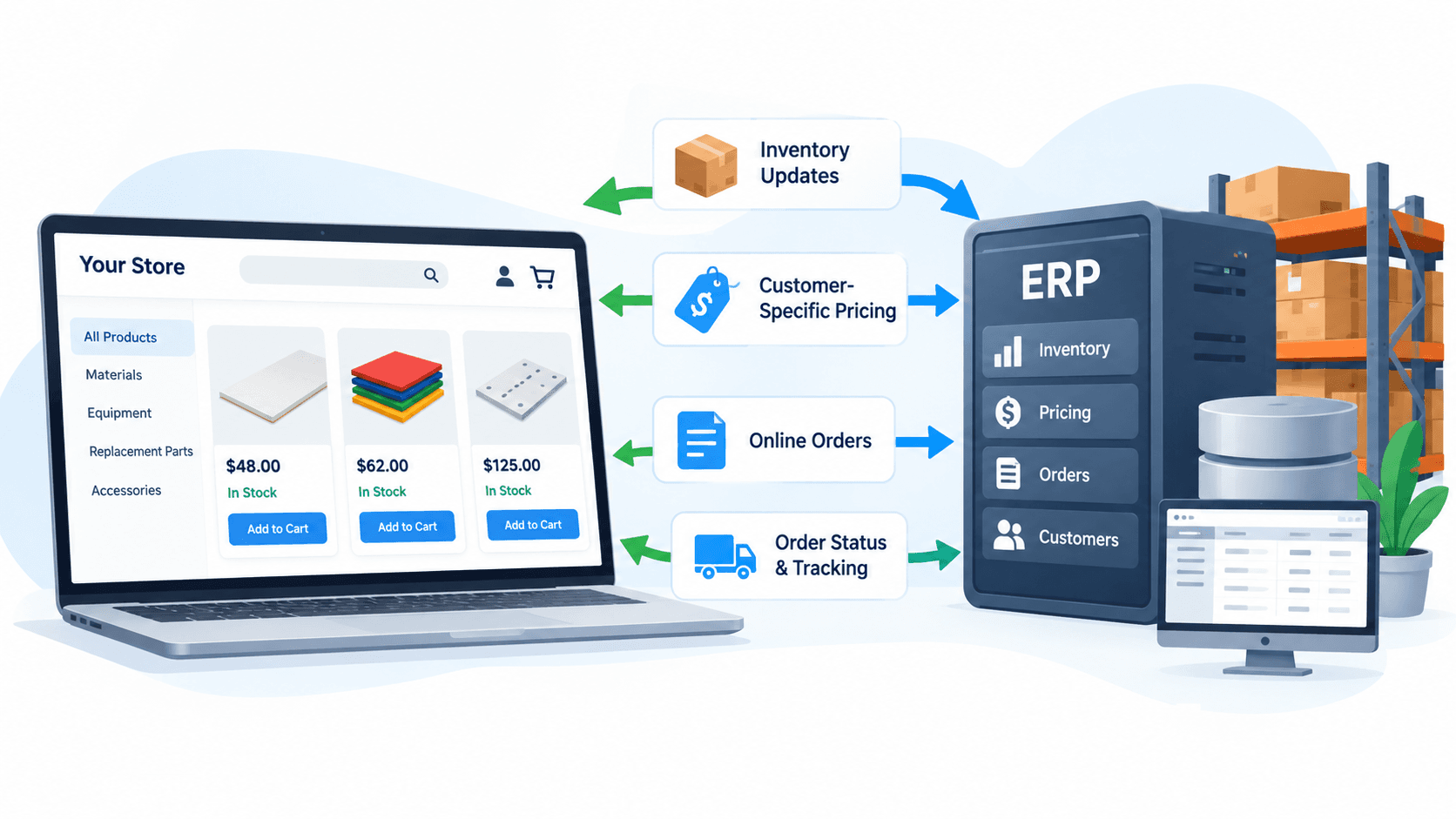
How Distributors Can Sync Inventory, Pricing, and Online Orders
A customer visits your online store and sees 40 units available. They place an order for 25.
The problem? Your warehouse only has 12 units available to sell. The rest are already reserved for other customers or haven't been updated in the store.
Now someone has to contact the buyer, correct the order, and explain the delay.
For distributors, wholesalers, and manufacturers, this is a common problem when online ordering and internal inventory systems operate separately.
Your website handles customer orders. Your ERP or inventory software manages stock, pricing, and fulfillment. But if they don't share accurate information, employees end up checking inventory, correcting prices, and entering orders manually.
The solution isn't always a new ERP or e-commerce platform. Often, it's connecting the systems you already use.
Here's how that connection works, what information needs to stay synchronized, and how to decide which approach makes sense for your business.
What Does ERP and E-Commerce Integration Actually Mean?
An ERP (Enterprise Resource Planning) system manages business operations such as inventory, purchasing, orders, accounting, and sometimes manufacturing.
An e-commerce platform handles the customer-facing side of purchasing: browsing products, viewing prices, and placing orders.
Connecting them allows information to move between the systems without employees repeatedly entering the same details.
For example:
- A warehouse receives inventory, and the available quantities update online.
- A wholesale customer signs in and sees their negotiated pricing.
- A customer places an online order, and it enters the internal order-management system.
- An order ships, and its tracking information becomes available to the customer.
This is often called ERP-to-e-commerce integration.
Not every distributor uses a traditional ERP. Some rely on accounting software, custom databases, inventory applications, or older internal systems.
The principle is the same: keep the system that manages the business connected to the system customers use to place orders.
Why Inventory Synchronization Is More Than Updating Stock Numbers
Suppose a distributor has 100 units of a product in its warehouse.
That doesn't necessarily mean all 100 units are available to sell.
Consider this example:
- Physical inventory: 100 units
- Reserved for existing orders: 30 units
- Held for inspection: 10 units
- Available to sell: 60 units
The website should display availability based on the business's inventory rules, not simply the physical quantity recorded in a database.
This becomes especially important when products are sold through multiple channels.
A business might receive orders through its website, Amazon, sales representatives, and direct wholesale accounts.
If each channel maintains inventory independently, the same units could appear available to several buyers.
The goal is to establish one reliable source of inventory information and determine how every sales channel receives updates.
Does Inventory Need to Update in Real Time?
Not every business requires real-time inventory synchronization.
There are three common approaches.
1. Scheduled synchronization
The online store retrieves inventory updates at set intervals, such as every few minutes or every hour.
This can work for slower-moving catalogs, but stock may become outdated between updates.
2. Event-based synchronization
When inventory changes, the internal system sends an event or notification that triggers an update to the online store.
This can reduce delays when the connected systems support reliable notifications.
3. Live availability checks
The website requests current inventory information when necessary, such as before accepting an order.
This can provide more current availability, but system response times, outages, and transaction volume need consideration.
For some businesses, a combination works best: scheduled updates for browsing and a final availability check before order acceptance.
Even then, checking availability doesn't automatically reserve stock. If two customers attempt to purchase the last available units simultaneously, the system needs reliable order allocation or reservation rules.
The right approach depends on how quickly products sell and how costly an incorrect stock quantity would be.
How Do You Synchronize Customer-Specific Pricing?
Inventory is only half the problem.
Many distributors don't charge every customer the same price.
Imagine a supplier selling one product to three different buyers:
- A retail customer pays the standard listed price.
- A long-term wholesale customer receives negotiated pricing.
- A high-volume customer receives contract pricing based on order quantities.
Showing everyone the same price would be incorrect.
Your ERP, pricing database, or another designated system should determine which pricing rules apply to each account.
The website can then display the appropriate price after identifying the customer.
Depending on the business, pricing rules may include:
- Customer-specific contracts
- Quantity and volume discounts
- Product categories or price groups
- Minimum order quantities
- Special pricing periods
- Units of measure, such as individual units, boxes, or cases
- Custom product dimensions and configurations
For example, ordering six individual units may have a different price than purchasing one case containing six units.
A proper integration needs to preserve those distinctions rather than copying a single price into the online store.
This is one reason B2B e-commerce works differently from consumer shopping.
The website has to support how the business actually sells.
What Happens When a Customer Places an Online Order?
Let's follow a typical wholesale order.
Step 1: The customer signs in
The online store identifies the customer's business account and determines which products, prices, and purchasing permissions apply.
Step 2: The customer builds an order
They select products and quantities.
The website displays the appropriate prices and inventory availability based on the connected business systems.
Step 3: The order is validated
Before accepting the order, the system checks important details.
For example:
- Are the requested quantities available?
- Is the customer's pricing correct?
- Are minimum order quantities satisfied?
- Does the order require approval?
- Are shipping requirements or restrictions applicable?
If something requires review, the customer should receive an appropriate status rather than an incorrect confirmation.
Step 4: The order enters the internal system
Once accepted, the order information moves into the ERP or order-management workflow.
This may include customer details, product identifiers, quantities, agreed prices, and shipping information.
The integration should also prevent duplicate orders if a transfer is retried after a temporary failure.
Step 5: Fulfillment information returns
As the order is processed, relevant updates can move back to the customer-facing system.
Customers can check order status, shipment information, or tracking details without repeatedly calling the office.
This is particularly useful for distributors with repeat customers placing the same orders regularly.
Instead of creating another place for staff to manage information, the online store becomes an extension of existing operations.
Do You Need a Connector, Custom Integration, or New Store?
This is where many businesses spend more than necessary.
Not every inventory integration requires a custom application. Not every older ERP needs replacing.
There are three common paths.
Option 1: Use an Existing Connector
Many e-commerce and inventory platforms offer built-in integrations or compatible third-party connectors.
These may already support inventory updates, order transfers, and product information.
Best for: Businesses using common software platforms with relatively straightforward workflows.
The limitation is flexibility. An existing connector may not support negotiated pricing, custom product configurations, or unusual approval requirements.
Start here if your existing tools already offer a reliable connection.
Option 2: Build a Custom Integration
A custom integration uses APIs, supported file exchanges, or middleware to connect systems based on the business's requirements.
This becomes useful when you need to:
- Connect an older or internally developed inventory system.
- Apply customer-specific pricing rules.
- Handle multiple warehouses or sales channels.
- Synchronize custom product configurations.
- Support approval processes that standard connectors cannot handle.
Best for: Businesses with specialized requirements that existing integrations cannot reliably support.
Custom development provides more flexibility but also introduces development, maintenance, testing, and monitoring responsibilities.
For a closer look at the approaches involved, see the integration patterns AliNQuality builds.
Option 3: Rebuild the Customer-Facing Store
Sometimes the underlying ERP works well, but the online store cannot handle the way customers actually purchase products.
Perhaps the catalog requires dimensions, material selections, customer-specific quoting, or an ordering experience the existing platform cannot support effectively.
In that situation, rebuilding the storefront may make sense without replacing the systems behind it.
Best for: Businesses whose existing customer-facing platform is the limitation.
The key is identifying which system is actually causing the problem before committing to a major replacement.
A Real Example: Plastic-Craft Products
This is the kind of challenge AliNQuality addressed through its work with Plastic-Craft Products.
PlasticCuttingBoards.com sells specialized cutting boards and replacement products where customers may need an exact size, thickness, material, color, or equipment compatibility.
That creates more complicated pricing and product requirements than a typical online catalog.
The website needed access to current pricing and inventory information without maintaining separate, manually updated values for every product variation.
AliNQuality rebuilt the storefront around the product requirements and connected pricing and stock to Plastic-Craft's structured business data. The website also connects to the company's custom CRM.
The published project results include:
- Live pricing and inventory: Connected to existing business data.
- Lower server costs: Reduced from approximately $1,500 to $400 per month following the migration and infrastructure changes.
- Revenue contribution: More than $100,000 generated through the specialized storefront.
These results reflect the broader storefront project, not inventory synchronization alone.
The important lesson is that the online store was designed around how the company already manages its products and operations.
The underlying systems didn't need to be discarded simply to create a better customer experience.
Read the PlasticCuttingBoards case study.
Common Problems That Cause Integrations to Fail
Connecting two systems doesn't guarantee accurate information.
Several issues deserve attention before launch.
Product Identifiers Don't Match
One system may use a different SKU or product code than another.
Without a reliable mapping process, inventory updates could affect the wrong product.
This also applies to variations, packaging sizes, and units of measure.
Customer Pricing Becomes Outdated
If a negotiated price changes internally but doesn't update online, a customer may submit an order using incorrect pricing.
The integration needs clear rules for how pricing changes are distributed and validated.
Orders Don't Transfer Successfully
An order might be accepted online while the connection to the ERP is temporarily unavailable.
Important integrations should include failure alerts, retry procedures, and records showing whether an order was successfully transferred.
Multiple Systems Control Inventory
If warehouse employees update one system while online orders modify an independent inventory database, quantities can become inconsistent.
Establish which system controls inventory and how other systems receive those updates.
Returns and Cancellations Aren't Accounted For
A canceled order may release reserved inventory.
A returned product may require inspection before becoming available again.
These steps need to be considered as part of the integration, not corrected manually after problems appear.
A reliable connection needs to handle changes and failures, not just successful new orders.
Five Questions to Answer Before Starting
Before purchasing another software subscription or commissioning custom development, examine how your current process works.
1. Where does inventory actually get updated?
Identify the system employees use when shipments arrive, products are sold, or stock is adjusted.
2. How are customer prices determined?
Document wholesale agreements, quantity discounts, contract pricing, and approval requirements.
3. Where do orders come from?
Include website orders, phone calls, email, sales representatives, and marketplaces.
4. How quickly must information update?
A business processing a few specialized orders each week may not need the same synchronization approach as one selling hundreds of products daily.
5. What happens when a connection fails?
Someone should be able to identify missing orders, investigate discrepancies, and safely retry unsuccessful transfers.
These answers will help determine whether an existing connector is sufficient or a more customized approach is necessary.
Start With the Connection That Removes the Most Work
Not every distributor needs a custom portal, a replacement ERP, or an expensive storefront rebuild.
If your employees spend hours copying web orders into accounting software, start by examining order transfer.
If your business regularly oversells products, prioritize inventory accuracy and synchronization.
If wholesale customers constantly contact staff to confirm negotiated pricing, investigate account-specific pricing.
Solve the problem causing the most operational friction before expanding the system.
At AliNQuality, we help distributors and manufacturers connect storefronts, pricing, inventory, and ordering workflows to the systems they already use.
Our focus is on improving how the business operates, not introducing software it doesn't need.
Not sure where your ordering process is breaking down?
Request a free workflow audit.
We'll review how inventory, pricing, and orders move through your current setup and identify what is worth connecting, improving, or leaving alone.
Keep Reading
Related articles
How to Connect Your Website, CRM, and Booking Software
AI Automation in Rockland County: Use Cases and Benefits for Local Businesses
Website vs. Web App vs. E-Commerce Platform: What Does Your Business Actually Need?
Not Sure Which Service You Need?
Most projects don't fit a neat box. Talk it through with someone who's built real systems.
Already know what you need? Tell us what you're trying to build or fix. Talk Through Your Project