
The Hidden Cost of Manual Work for Westchester County Businesses
Copy-paste, re-keying, and chasing approvals quietly drain hours from Westchester County teams. Here's a real lead-to-order workflow, the three places it breaks, and the practical way to claw the time back.
Westchester County is full of established small and midsized businesses — downtown professional-service firms in White Plains, Tarrytown, and New Rochelle; distributors, contractors, and light-industrial teams in the corridors of Yonkers, Mount Vernon, and Elmsford. Across those businesses, the same quiet problem repeats: capable people spending too much of their week on work a computer could reliably handle.
It rarely feels like a crisis. It feels like Tuesday. But the hours add up, and they add up fastest at exactly the small and mid-sized companies that can least afford to lose them.
How much time is actually lost
The research here is consistent and uncomfortable. A Smartsheet survey on automation in the workplace found that workers lose roughly a quarter of their work week to manual, repetitive tasks — and that nearly 60% of workers believe they could save six or more hours a week, almost a full workday, if the repetitive parts of their jobs were automated. The same workers overwhelmingly say that time is a poor use of their skills.
The ceiling on what's automatable is higher than most owners assume, but lower than the hype suggests. The McKinsey Global Institute's widely cited analysis found that fewer than 5% of jobs can be fully automated, while in about 60% of occupations at least a third of the day-to-day activities could be. In plain terms: automation almost never replaces a role, but it very often removes the worst third of it.
What one of these workflows actually looks like
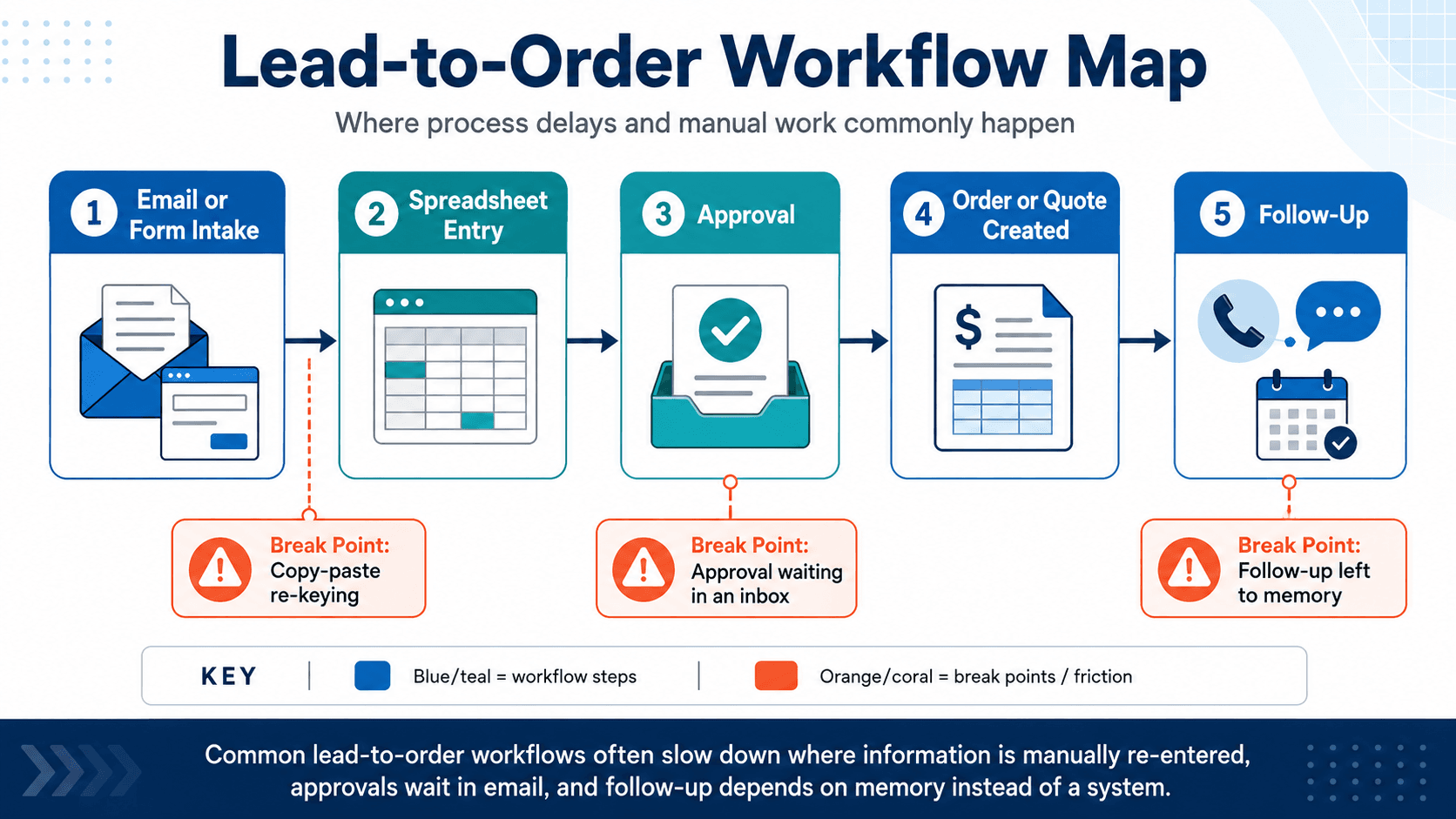
Here's a process almost every Westchester business runs in some form — turning an inquiry into an order or quote:
A lead emails or fills out a form, someone copies the details into a spreadsheet, it waits for a manager's sign-off, it becomes an order or a quote, and someone is supposed to follow up.
On paper it's five steps. In practice it breaks in three predictable places:
- The copy-paste. Re-keying the same details from an email into a spreadsheet — and later into an invoicing or order tool — is pure manual time, and it's where typos and wrong quantities sneak in.
- The approval. The request sits in someone's inbox until they happen to see it. No one is tracking how long, so "we're a little behind this week" quietly becomes a lost deal.
- The follow-up. If following up depends on someone remembering, then your service quality depends on how busy the day was — and the quotes that don't get a nudge tend to go cold.
Automated, the same workflow runs itself: the form writes straight into your system, routes to the right person for approval with a reminder if it stalls, generates the order or quote, and triggers a consistent follow-up sequence. No re-keying, nothing sitting silently in an inbox, nothing left to memory. That's the core of workflow automation — and it's not just orders: the same pattern fixes monthly reports rebuilt by hand and data re-entered across tools that were never connected. You can map your own version with our workflow builder.
Automation isn't about replacing people
This is worth being honest about, because the word "automation" carries baggage. The goal is not a smaller team; it's a team that spends its hours on judgment, relationships, and the work only people can do. The rule of thumb is simple: use plain, coded workflows wherever the logic is fixed — intake routing, reminders, approvals, scheduling, status updates, scheduled reporting. Those are deterministic, reliable, and cheap to run once built.
Practical first automations
The best first project is the one that's both painful and repetitive. A few that tend to pay off quickly:
- Intake to follow-up. Route a new inquiry to the right person automatically and trigger a consistent follow-up sequence, so nothing depends on someone remembering.
- Status dashboards. Replace "where does this stand?" emails with a live view of open jobs, requests, or orders.
- Reports that build themselves. Move from rebuilding a monthly report by hand to having the system generate it on a schedule. See the idea in our report generator.
Start with one workflow
You don't need an automation strategy; you need one workflow. Pick the task your team repeats most, time how long it takes today, automate it, and measure the difference. That single number — hours returned per week — is usually all the business case you need to fund the next one. If you'd like help finding the right first workflow, tell us how your team currently works and we'll point to where the time is leaking.
One sequencing note: if "add AI" is on your list, automate and clean up the underlying workflow first. We explain why in our companion piece, AI for Rockland and Westchester businesses.
Sources
- Smartsheet, "Automation in the Workplace" report (time lost to manual tasks; hours workers could save) — smartsheet.com
- McKinsey Global Institute, research on automation potential (share of occupations with automatable activities) — mckinsey.com
Related resource
Keep Reading
Related articles
AI Automation in Rockland County: Use Cases and Benefits for Local Businesses
Website vs. Web App vs. E-Commerce Platform: What Does Your Business Actually Need?
Phone, Fax, and Lost Orders: Why Rockland County's Manufacturers and Distributors Are Behind on B2B Ordering
Not Sure Which Service You Need?
Most projects don't fit a neat box. Talk it through with someone who's built real systems.
Start a conversation